

NEXURACART JOURNAL
10 Useful Desk Accessories for a More Organised Workspace in the UAE
20 October 2026
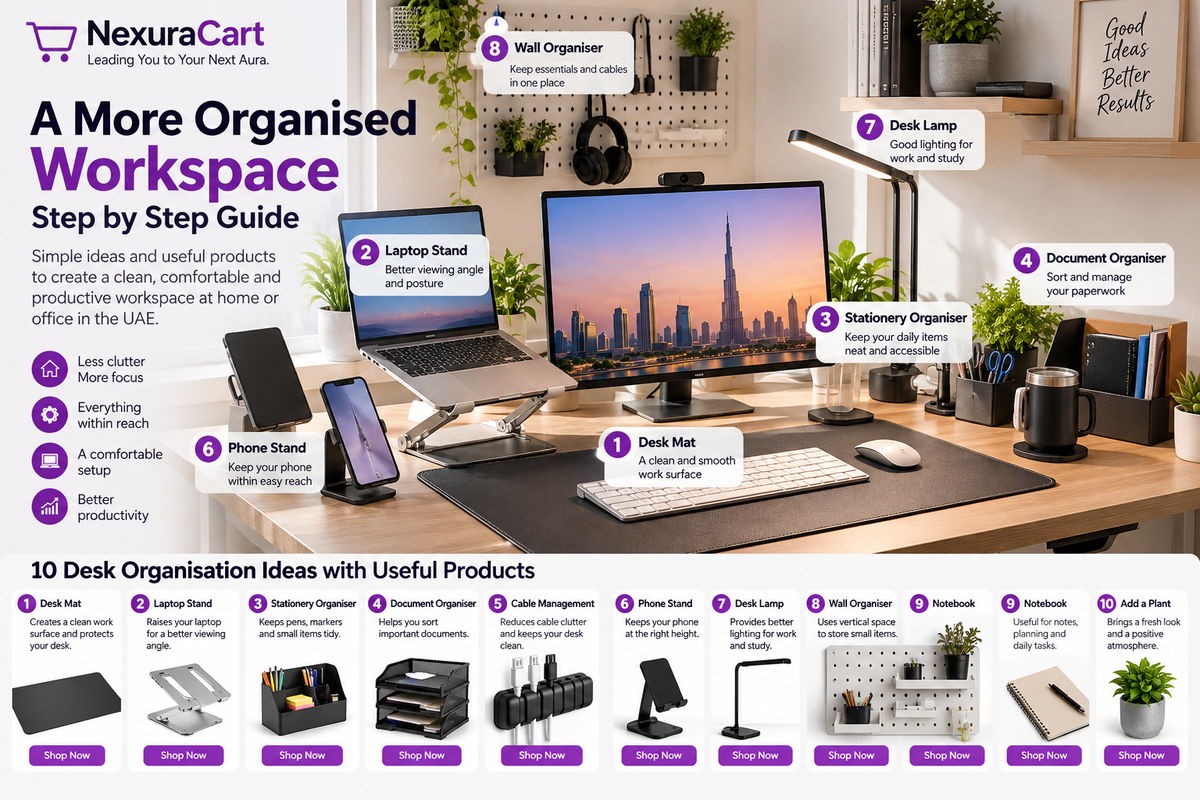
Is your desk crowded with papers, charging cables and stationery? Whether you work from home in Dubai or study in Abu Dhabi, you can build a more organised workspace without buying a new desk. This practical guide explains what to place where, why each zone matters, and how to choose useful accessories.

Step 1: Clear the desk and plan three zones
Remove everything, wipe the surface, and sort items into daily use, occasional use and storage. Reserve the centre for the screen, keyboard and mouse; one side for stationery and notes; and the back edge for cables and less-used items. Keep your dominant-hand side clear for mouse movement.
Step 2: Arrange your screen and laptop
Place your screen directly in front of you at a comfortable viewing distance. Raise a laptop only on a stable stand and check the device manufacturer's ventilation guidance. For long sessions, a separate keyboard and mouse can make positioning easier.
Step 3: Add a practical desk mat
Measure the available surface before choosing a mat. A mat can define your working area and help protect the desk, but should not crowd notebooks or block drawers.
Step 4: Give every small item a home
Group pens, sticky notes and scissors in a holder or organiser. Keep only one or two frequently used pens in reach and store duplicates elsewhere.
Step 5: Create a simple paperwork system
Use three labelled folders or trays: To Do, Waiting and Filed. Process loose papers once per day. Keep confidential documents in secure storage, not openly on the desk.
Step 6: Tidy cables safely
Route cables behind the desk with removable ties. Avoid tight bends, overloaded power strips and covering ventilation openings. Keep chargers accessible without letting cords cross the main work surface.
Step 7: Position your phone and daily notebook
Keep your phone on the opposite side from your mouse when possible. Put a small notebook beside your keyboard for meeting notes and quick tasks.
Step 8: Improve lighting
Position a lamp so it illuminates paper without shining into your eyes or reflecting directly off the screen. Use daylight when available, but adjust blinds to limit glare.
Step 9: Use vertical storage thoughtfully
Wall shelves or organisers can free desk space. Follow installation instructions, avoid excessive loads and keep heavy items off high shelves.
Step 10: Maintain a five-minute reset
At the end of each day, put stationery back, file paperwork, unplug unnecessary accessories and clear your main work area. Small daily habits are more sustainable than occasional major clean-ups.
Real NexuraCart products to consider
1. Large Desk & Mouse Mat

Place the mat in front of the screen, with enough space on both sides for your hands and mouse. Its 70 × 30 cm size suits many compact desks.
2. Ayzoq 7-Level Adjustable Laptop Stand

Position the stand centrally and adjust its height so you can view the screen without constantly bending your neck. Use an external keyboard for longer sessions.
3. TT 2-Layer Desk Organizer with Drawer

Put pens and daily-use accessories on the upper level; use the drawer for small items that would otherwise scatter across the desk.
4. GMAX Aluminium Notebook Stand

Consider this foldable stand for a second workstation or when you need a portable laptop setup.
Frequently asked questions
How do I organise a small office desk?
Keep the centre clear, group small items in a single organiser and move infrequently used supplies into drawers or shelves.
Should I use a laptop stand?
A stable, appropriately sized stand may help position your screen more comfortably. Consider an external keyboard and mouse for longer work sessions.
What desk accessories should I buy first?
Choose based on your biggest problem: a mat for your main work surface, a stand for screen placement or an organiser for scattered stationery.
Where can I shop for desk accessories in the UAE?
Browse the linked NexuraCart products above and check the latest prices, availability and delivery details on each product page.
NexuraCart — Leading You to Your Next Aura.